
72 lines
5.6 KiB
Markdown
72 lines
5.6 KiB
Markdown
---
|
||
title: 在Linux检查X86-64 CPU微架构版本
|
||
source: https://juejin.cn/post/7291243530358865979
|
||
author:
|
||
- "[[thinktik]]"
|
||
published: 2023-10-19
|
||
created: 2025-09-30
|
||
description: 什么是CPU微架构版本 众所周知X86架构的CPU主要是Intel和AMD开发和制造,目前已经有了40多年的历史(X86于1978年6月8日发布)。X86的64位版最先在1999年由AMD开发,一般被
|
||
tags:
|
||
- clippings
|
||
updated: 2025-09-30T12:08
|
||
---
|
||
 
|
||
|
||
## 什么是CPU微架构版本
|
||
|
||
众所周知 `X86` 架构的CPU主要是Intel和AMD开发和制造,目前已经有了40多年的历史(X86于1978年6月8日发布)。X86的64位版最先在1999年由AMD开发,一般被简写为 `X64` 、 `AMD64` 、 `X86_64` 、 `X86-64`;X86-64也有20多年的历史了,这数十年间,CPU经过了数不清的技术创新和迭代,哪怕是 `X86-64` 架构也逐渐有了不同的微架构版本。现在(2023)可能最初的原始版本的 `X86-64` 架构的CPU都基本已经早没人使用了!
|
||
|
||
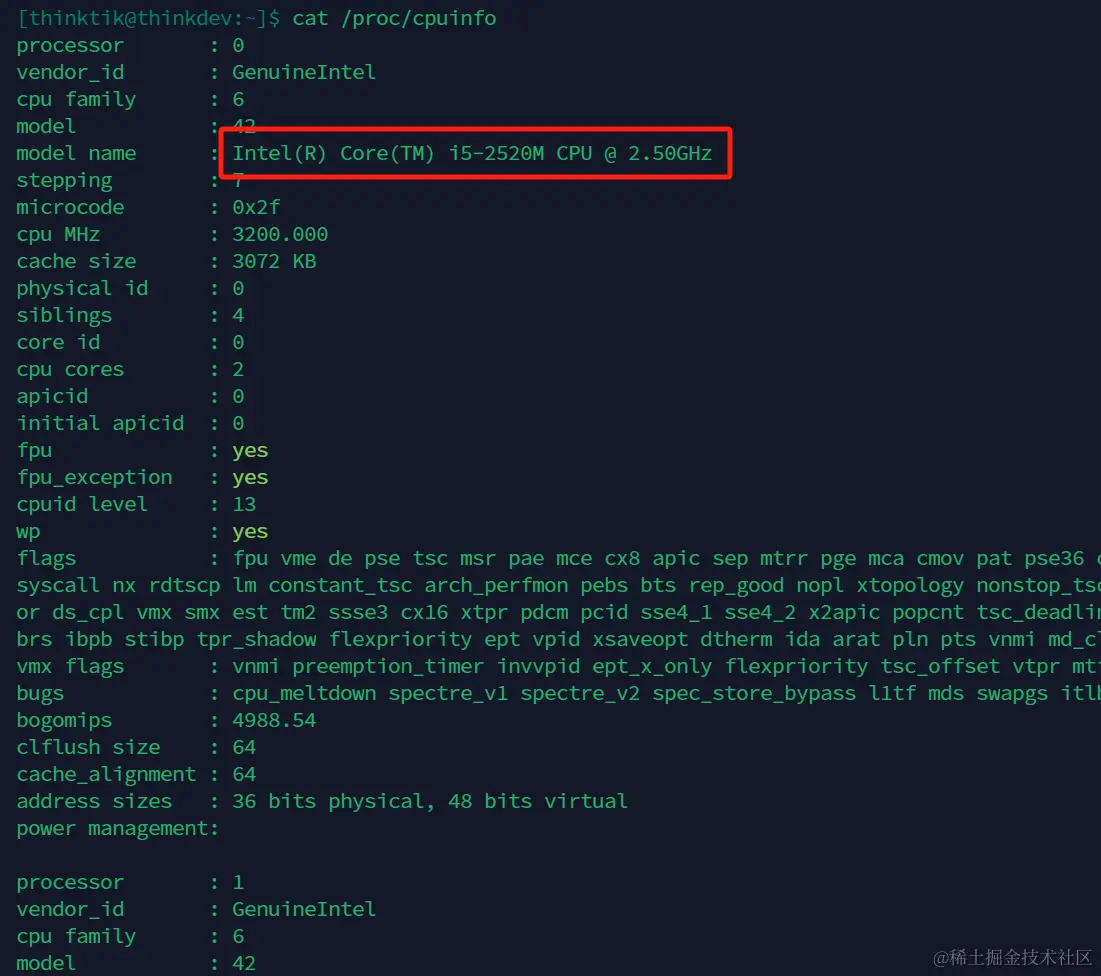
Linux的兼容性一直都非常好,为了尽量的保持向前兼容性,一般10多年前的老旧电脑都会得到非常好的支持。比如我在2012年买的Dell笔记本当时使用的是Intel Core i5-2520M,虽然已经有了至少11年的寿命了,但是 `CentOS Stream 9` / `Linux` 依然全天24小时正常持续无故障运行。这里不得不感叹CPU的质量和Linux等操作系统的稳定性!
|
||
|
||
|
||
|
||
不过维护大量的过时的老硬件会消耗大量的开源开发者的精力,而且老旧的硬件一般早已经很少有人使用了,维护老旧硬件所服务的目标受众非常少,相反花大量的人力在非常旧的硬件的维护上阻碍了创新,为了兼容性牺牲性能也是得不偿失的。所以后续的一些 `Linux` 发行版开始逐渐停止支持老旧的CPU,比如停止支持X86 32位的CPU,停止支持 `X86-64` 早期版本的CPU等。
|
||
|
||
目前我们使用的 `Ubuntu` 、 `Fedora` / `CentOS Stream` / `RedHat` 的最新版本都计划或者已经停止了 `X86` 32位架构的支持,此外对未来会出现的 `CentOS Stream 10` / `RedHat 10` / `Fedora` 而言最低支持的 `X86-64` 微架构则为 `x86_64-v3` 。
|
||
|
||
当我们以后在安装新版本的 `Linux` 发行版,比如 `CentOS Stream 10` / `RHEL 10` / `Rocky 10` 时,我们最好先对自己的老硬件进行检查。我们可以把下面的代码保存在 `cpu_microarchitecture_level`,并赋予可执行权限后进行 `X86-64` CPU微架构版本检查
|
||
|
||
```
|
||
#!/usr/bin/awk -f
|
||
|
||
BEGIN {
|
||
while (!/flags/) if (getline < "/proc/cpuinfo" != 1) exit 1
|
||
if (/lm/&&/cmov/&&/cx8/&&/fpu/&&/fxsr/&&/mmx/&&/syscall/&&/sse2/) level = 1
|
||
if (level == 1 && /cx16/&&/lahf/&&/popcnt/&&/sse4_1/&&/sse4_2/&&/ssse3/) level = 2
|
||
if (level == 2 && /avx/&&/avx2/&&/bmi1/&&/bmi2/&&/f16c/&&/fma/&&/abm/&&/movbe/&&/xsave/) level = 3
|
||
if (level == 3 && /avx512f/&&/avx512bw/&&/avx512cd/&&/avx512dq/&&/avx512vl/) level = 4
|
||
if (level > 0) { print "CPU supports x86-64-v" level; exit level + 1 }
|
||
exit 1
|
||
}
|
||
```
|
||
|
||
效果如下,我的CPU是很老的第二代Intel酷睿,目前X86-64微架构级别为 `x86-64-v2` 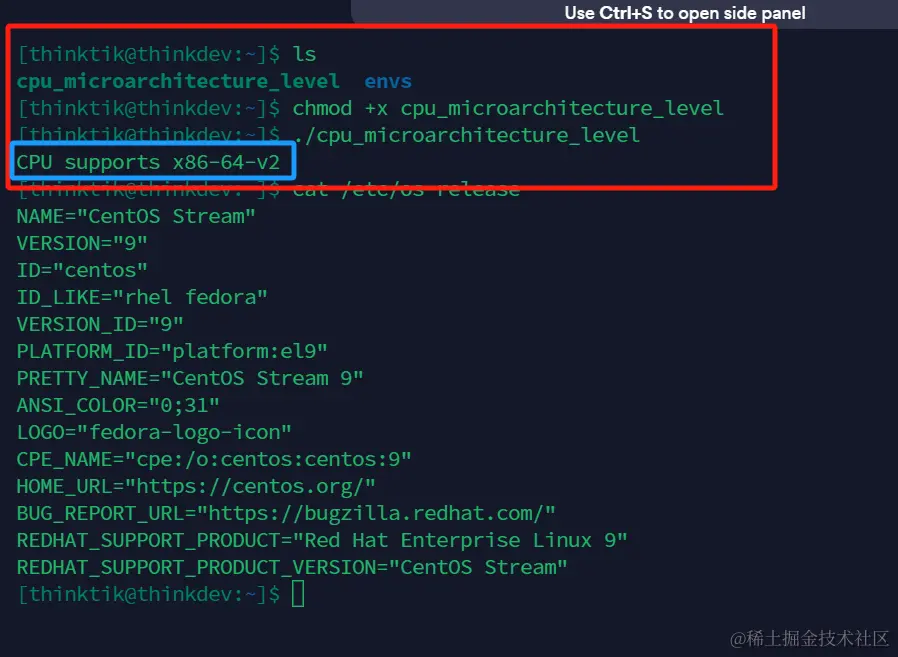
|
||
|
||
## 参考
|
||
|
||
- [Building Red Hat Enterprise Linux 9 for the x86-64-v2 microarchitecture level](https://link.juejin.cn/?target=https%3A%2F%2Fdevelopers.redhat.com%2Fblog%2F2021%2F01%2F05%2Fbuilding-red-hat-enterprise-linux-9-for-the-x86-64-v2-microarchitecture-level "https://developers.redhat.com/blog/2021/01/05/building-red-hat-enterprise-linux-9-for-the-x86-64-v2-microarchitecture-level")
|
||
- [\[CentOS-devel\] Fedora ELN architecture baseline preparation for CentOS Stream 10](https://link.juejin.cn/?target=https%3A%2F%2Flists.centos.org%2Fpipermail%2Fcentos-devel%2F2023-March%2F142814.html "https://lists.centos.org/pipermail/centos-devel/2023-March/142814.html")
|
||
- [CentOS ISA SIG Performance Investigation](https://link.juejin.cn/?target=https%3A%2F%2Fblog.centos.org%2F2023%2F08%2Fcentos-isa-sig-performance-investigation%2F "https://blog.centos.org/2023/08/centos-isa-sig-performance-investigation/")
|
||
- [How do I check if my CPU supports x86-64-v2?](https://link.juejin.cn/?target=https%3A%2F%2Funix.stackexchange.com%2Fquestions%2F631217%2Fhow-do-i-check-if-my-cpu-supports-x86-64-v2 "https://unix.stackexchange.com/questions/631217/how-do-i-check-if-my-cpu-supports-x86-64-v2")
|
||
- [15 Linux Distributions You Can Rely on for Your Ancient 32-bit Computer](https://link.juejin.cn/?target=https%3A%2F%2Fitsfoss.com%2F32-bit-linux-distributions%2F "https://itsfoss.com/32-bit-linux-distributions/")
|
||
- [Optimising Ubuntu performance on amd64 architecture](https://link.juejin.cn/?target=https%3A%2F%2Fcanonical.com%2Fblog%2Foptimising-ubuntu-performance-on-amd64-architecture "https://canonical.com/blog/optimising-ubuntu-performance-on-amd64-architecture")
|
||
|
||
本文收录于以下专栏
|
||
|
||

|
||
|
||
The way with code
|
||
|
||
专栏目录
|
||
|
||
最难走的路就是最正确的路
|
||
|
||
3 订阅
|
||
|
||
·
|
||
|
||
56 篇文章
|
||
|
||
评论 0
|
||
|
||
暂无评论数据 |