127 lines
3.5 KiB
Markdown
127 lines
3.5 KiB
Markdown

|
|
|||
|
|
Generate a hierarchical table of contents for {}. Use appropriate heading levels (H1, H2, H3, etc.). Include page numbers if present. Return only the table of contents.
|
|||
|
|
# 东玺门
|
|||
|
|
## 主路由器 RM-9161
|
|||
|
|
小米AX6000 刷openwrt cattools23.XXX
|
|||
|
|
root/rmiAdmin@1406
|
|||
|
|
SSID:qwert123
|
|||
|
|
是否要设置外网frp穿透访问待定,安全问题!
|
|||
|
|
|
|||
|
|
## 软路由 SRouter
|
|||
|
|
OpenWrt 192.168.1.200 HM740 OP X64 cerelon 1017U
|
|||
|
|
固件版本:OpenWrt GDQ Version V1[2025] Compiled by eSir / LuCI openwrt-24.10 branch 25.014.55016~7046a1c
|
|||
|
|
内核架构: Intel(R) Celeron(R) CPU 1017U @ 1.60GHz : 2C2T
|
|||
|
|
磁盘:30G
|
|||
|
|
内存:4G
|
|||
|
|
|
|||
|
|
|
|||
|
|
192.168.1.200
|
|||
|
|
root/J6ff19b8@ow
|
|||
|
|
## 小米路路由器R2D XM-9161
|
|||
|
|
admin/admin@123!@#
|
|||
|
|
192.168.1.144
|
|||
|
|
已破解,可SSH
|
|||
|
|
|
|||
|
|
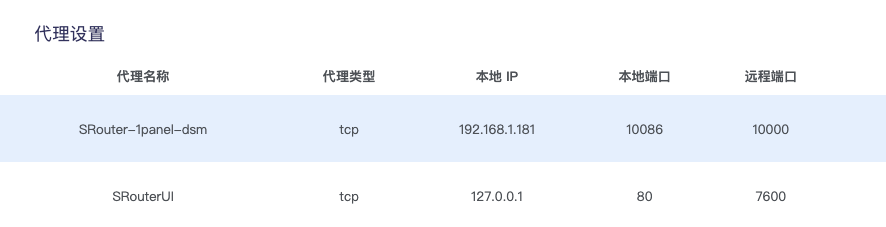
- 设置了2个frp代理
|
|||
|
|
|
|||
|
|
|
|||
|
|
|
|||
|
|
## 华为 AK9161
|
|||
|
|
AX3 Pro
|
|||
|
|
192.168.1.134
|
|||
|
|
|
|||
|
|
## AirExpress TP9161
|
|||
|
|
TC9161
|
|||
|
|
|
|||
|
|
|
|||
|
|
## TPLink TPA9161
|
|||
|
|
|
|||
|
|
# 天园
|
|||
|
|
|
|||
|
|
## 主路由器 ZX-9161
|
|||
|
|
中兴ZXE1630,已重新刷了固件AX。。。
|
|||
|
|
MM:Zxe1630@9161
|
|||
|
|
|
|||
|
|
## 华为
|
|||
|
|
|
|||
|
|
|
|||
|
|
## CPE
|
|||
|
|
|
|||
|
|
## 华为无线WIFI放大器
|
|||
|
|
|
|||
|
|
HW-9161
|
|||
|
|
管理密码:Mayi19b8 M@yi19b8
|
|||
|
|
|
|||
|
|
SSID:qwert123
|
|||
|
|
|
|||
|
|
## 小米路由器 AX3000T
|
|||
|
|
|
|||
|
|
- 帐号密码备忘
|
|||
|
|
|
|||
|
|
root/xmAdmin@9161
|
|||
|
|
|
|||
|
|
LAN:192.168.1.201
|
|||
|
|
|
|||
|
|
|
|||
|
|
必须在LAN口接入网络或者无线接入才能进行管理,外网无法进管理界面
|
|||
|
|
|
|||
|
|
- 刷机小结
|
|||
|
|
|
|||
|
|
1. 刷完纯净版openwrt24.10,剩下60M空间,只能根据需要安装一些必要的插件:access control/frpc/动态DDNS+阿里script/
|
|||
|
|
2. 刷机方法有两种,采用了简单的方式,没有用uboot,
|
|||
|
|
|
|||
|
|
教程:固件先升级到1.0.91,去小米官网下载后升级,再开始进行刷机
|
|||
|
|
|
|||
|
|
[https://sspai.com/post/96555](https://sspai.com/post/96555)
|
|||
|
|
|
|||
|
|
[https://github.com/openwrt-xiaomi/xmir-patcher](https://github.com/openwrt-xiaomi/xmir-patcher)
|
|||
|
|
|
|||
|
|
几个坑记录一下:
|
|||
|
|
|
|||
|
|
Mac下xmir-patcher 工具(用于开启 SSH 功能)不能运行,需要python8
|
|||
|
|
|
|||
|
|
在windows下SSH也不能登录成功,见下面参考链接
|
|||
|
|
|
|||
|
|
Unable to negotiate with 192.168.31.1 port 22: no matching host key type found
|
|||
|
|
|
|||
|
|
ssh -o HostKeyAlgorithms=+ssh-rsa -o PubkeyAcceptedKeyTypes=+ssh-rsa root@192.168.31.1
|
|||
|
|
|
|||
|
|
[https://www.right.com.cn/FORUM/thread-8238692-1-1.html](https://www.right.com.cn/FORUM/thread-8238692-1-1.html)
|
|||
|
|
|
|||
|
|
[https://blog.csdn.net/weixin_62724105/article/details/143220110](https://blog.csdn.net/weixin_62724105/article/details/143220110)
|
|||
|
|
|
|||
|
|
上传3个刷机文件到设备时,不能使用sftp(Termius)scp参数需要加上-O
|
|||
|
|
|
|||
|
|
scp openwrt-24.10.0-mediatek-filogic-xiaomi_mi-router-ax3000t-initramfs-factory.ubi root@192.168.31.1:/var
|
|||
|
|
|
|||
|
|
scp -O "D:\Administrator\Downloads\openwrt-24.10.0-mediatek-filogic-xiaomi_mi-router-ax3000t-initramfs-kernel.bin" root@192.168.1.1:/var
|
|||
|
|
|
|||
|
|
[https://www.bilibili.com/opus/702779880955183108](https://www.bilibili.com/opus/702779880955183108)
|
|||
|
|
|
|||
|
|
[https://forum.openwrt.org/t/ash-usr-libexec-sftp-server-not-found-when-using-scp/125772/3](https://forum.openwrt.org/t/ash-usr-libexec-sftp-server-not-found-when-using-scp/125772/3)
|
|||
|
|
|
|||
|
|
opkgupdate需要注释check signature
|
|||
|
|
|
|||
|
|
3. 插件一般包含底包.ipk文件+界面管理包webadmin luci-app-XXX.ipk
|
|||
|
|
4. 软件路由方式有:飞牛/群晖安装虚拟机VM(不推荐),小型工控机+飞牛/黑群晖+X86,直接docker安装openwrt镜像
|
|||
|
|
5. 使用相关的NAS固件:istoreos/immor/CarWrt/。。。
|
|||
|
|
6. 旁路路由器推荐软路由,设置有待验证
|
|||
|
|
|
|||
|
|
# 鼎龙湾
|
|||
|
|
|
|||
|
|
|
|||
|
|
## 小米路由器
|
|||
|
|
小米R2D admin/admin@123
|
|||
|
|
原来天园家用路由器,可以SSH
|
|||
|
|
SSID:XM-9161 qwert123
|
|||
|
|
下次去将光猫对应接口改为桥接,由自己的路由器拨号
|
|||
|
|
|
|||
|
|
|
|||
|
|
# 监利
|
|||
|
|
|
|||
|
|
|
|||
|
|
H310M主机一台
|
|||
|
|
|
|||
|
|
Win7
|
|||
|
|
|